What an AI team is — and what “AI employee” really means
“AI employee” is the popular name for an AI agent that has a defined job and real tools to do it: a phone line, your customer and order records, your social media accounts. The difference from a chatbot is the last step. A chatbot suggests what to say; an agent places the call, creates the order, publishes the post — and reports back.
An AI team is several such agents with separate jobs that share one chat, one memory and one set of records about your business. Separate jobs keep each agent focused on its own work; the shared records keep them from working blind — what one agrees on a call, the next turns into an invoice without you retyping anything.
For a small business this covers the everyday routine: calls, bookings, customers and orders, invoices and payments, posts, reminders. It does not cover judgement, responsibility or guaranteed results — those stay with you, and the section on limits below says so plainly.
What is the best AI for a small business? A chatbot, separate tools, an AI team or a hire
Five ways a small business can get help today, compared as categories. The right one depends on where your hours actually go.
| Option | Good at | Falls short | Fits when |
|---|---|---|---|
| A general AI chatbot | Writing, explaining, ideas and quick answers on any topic, in one subscription. | On its own it talks rather than acts: no phone line, no customer records, no posting to your accounts. You carry every result into your tools yourself. | You mainly need help with text and thinking, and you do the rest. |
| Single-purpose AI tools | Depth in one job — answering calls, or invoicing, or scheduling posts. | Each has its own app, login, data and bill. The call does not know about the invoice, and you are the glue between them. | One problem clearly outweighs the others. |
| A CRM system | Order in customers, deals and reminders, and reports for a sales team. | A person keeps the records, and a person still calls the customers and writes the invoices and posts. | You have a sales team that needs deals and reports. |
| An app with specialist AI agents, such as Weyvox | Calls, customers and paperwork, social media and goals in one chat, with shared records and memory; one subscription with monthly credits. | Built for the everyday work of a small business, not for every specialist need: no ad campaigns, not a certified e-invoicing platform. It is AI, so it can make mistakes, and you check what matters. | You are the one who answers the phone, sends the invoices and posts — and you want the routine off your hands. |
| Hiring a person | Judgement, relationships, hands-on work and real responsibility. | A salary and employer costs every month, busy or quiet, plus the time to find and train someone. One person rarely covers the phone, the paperwork and marketing equally well. | The work needs hands, a face or decisions — and there is enough of it to pay a salary. |
The options combine. AI agents take the routine, people keep the work that needs them — and in Weyvox your staff work in the same app, each with their own access code.
Four AI agents for a small business, each with their own job
- Leo — AI coordinator. At registration he asks what brought you and suggests the agents for it. Keeps your business profile, remembers what matters about you and reminds you on time, searches the web and reads links, hands work to his colleagues and brings the results together. He carries out long tasks in the background and, on the Business and Professional plans, also runs your Goals. Leo is the one agent that cannot be switched off.
- Cindy — AI receptionist. Answers calls on your business number when you can’t — at once, or after 10, 20, 30 or 40 seconds of ringing — and calls customers and partners on your behalf. She introduces herself as an AI agent at the start of every call, talks at the pace of a live conversation in over 40 languages, texts customers and leaves a note in the chat after every call. You can take over any call at any moment.
- Marc — AI manager. Keeps your customers, orders, services and prices. He books customers into open slots around your calendar, prepares invoices, completion certificates, contracts and other documents as PDFs from your own templates and forms — plus presentations and spreadsheets — and keeps track of payments and debts.
- Alice — AI marketer. Runs the accounts you connect on eight networks — Instagram, Facebook, TikTok, YouTube, LinkedIn, Threads, Pinterest and Bluesky. She writes and publishes posts to a plan, replies to comments, shows statistics, and creates photos, videos, voice-overs and music.
Each agent has a page in Settings with its own tools, a page of their own on this site (linked above) and guides, linked at the end of this page.
Not one chatbot but four specialists: one chat, shared records
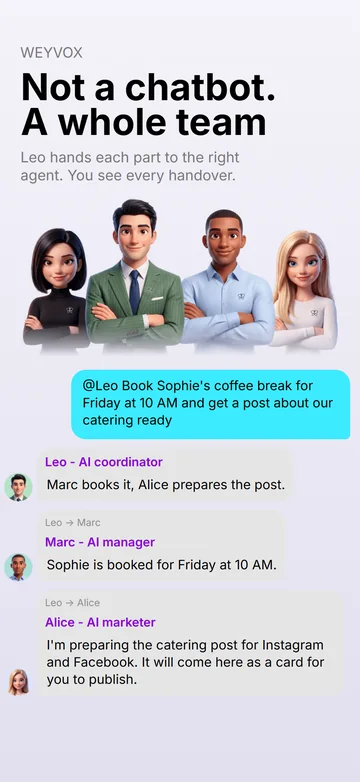
- One chat. The whole team is in the Weyvox tab. Start a message with @Leo, @Cindy, @Marc or @Alice — or tap an avatar — to address one of them. Without a name, the agent you are already talking to carries on, and a new request goes to whoever it belongs to, or to Leo.
- Visible handovers. When work passes from one agent to another, the chat shows a line such as “Leo → Marc”, and the next agent starts with the facts already gathered. Every reply is signed with the agent’s name, so you always know who is speaking.
- Shared records. Marc keeps the customers, orders and price list; Cindy quotes from that price list and books into your open slots; what she agrees becomes an order Marc can invoice; Alice takes your offers and prices from the same place for her posts; and what Leo remembers about you, the whole team uses.
- Nobody covers for a switched-off colleague. Ask for work that belongs to an agent you switched off, and you are told who does it; a card under the message offers Switch on just for this task — the colleague does it and switches itself off again — or Keep it on.
- One account. All four work from the same plan credits — an agent you switch off costs nothing — and every charge is listed in Balance & usage with the agent behind it. Your account data is stored on servers in the EU; some processing by AI providers may take place outside the EEA under the safeguards described in the Privacy Policy.
How AI helps a small business: a day with a heating engineer who works alone
You install and service boilers on your own. One Friday could look like this:
- 07:30 · Leo. The reminder you asked for last night arrives: pick up the new filter before Sophie Martin’s boiler service at 10:00.
- 08:50 · Cindy. A new customer calls while you are driving. After 20 seconds of ringing, Cindy answers in your business name, says she is an AI agent, quotes the annual service from your price list and offers Tuesday at 14:00 — a slot that is open in your calendar. The caller agrees; she records the customer and the order and, once the caller says yes, texts a confirmation. A note waits in the conversation with that number, and the order stays Not confirmed until you check it and tap Confirm.
- 11:30 · Marc. Sophie’s service is done. You write “@Marc make an invoice for Sophie Martin for the boiler service” and get a PDF invoice for 180.00 EUR, payment due by 10 October, filed in Documents and attached to her order.
- 12:10 · Alice. You send Alice a photo of the finished boiler room with “@Alice make a post about our promotional offer”. She sends a post card with the text for each network and the picture; you tap Publish, and the post is scheduled for Instagram and Facebook at 18:00.
- 15:20 · Leo → Marc, Leo → Cindy. “@Leo Sophie paid. Mark it and send her a thank-you SMS.” Marc marks the 180.00 EUR as paid — on your word — and Cindy sends the SMS.
- 21:00 · you. The Results tab shows the day: revenue, what is still unpaid, what needs your attention, one line per agent — and what the AI team cost.
Four short messages from you, no call answered at the wheel, and two things you checked yourself: the new order and the post.
You decide what each agent does alone
Each agent’s page (Settings → the team card → the agent) has two switches. Agent at work turns an agent on or off — any of them except Leo. Autonomy decides whether the agent waits for your yes or acts and reports back:
- Leo. Off — he asks before removing anything from his memory. On — he removes reminders that have passed and facts that no longer hold, and briefly says what he removed.
- Cindy. Off — before every call from the chat she shows a card with the number and the purpose, and background tasks call no one. On — she places calls herself, from the chat and in background tasks.
- Marc. Off — before booking a time, changing an order, texting a customer or issuing an invoice, completion certificate or contract, he shows what he is about to do and waits for your yes. On — he does all of it himself.
- Alice. A post she prepares in the chat always comes as a post card and goes out only after you tap Publish; Autonomy matters for the posts of an approved Social media plan. Off — each comes to you as a post card with a push notification and goes out only after your Publish. On — she schedules them herself; a reel with defects found by the quality check still never goes out without your Publish anyway.
Some things stay yours whatever the switches say: a payment is marked only when you say the money arrived, a goal starts only when you accept its card, and any call Cindy is on can be opened from the mini card in the app — to listen, take it over or end it.
Autonomy comes with the Business and Professional plans. On Start the switch is visible but off, with a lock, and every agent asks you before each action; your choice is kept and works again on Business.
Goals: give the team a result, not a to-do list
A task tells an agent what to do; a goal tells the team what should change. You tell Leo in the chat what you want — “collect what customers owe”, “20 new customers in October” — and he comes back with a New goal card:
- what counts as done — a metric from a fixed list (debt, missed calls, orders, revenue, average order value, repeat orders, new customers, call conversion) with a target, or a clear result;
- a deadline, the steps with the agent for each, and the actions allowed — calls, SMS, posts, images, documents and so on;
- an estimate calculated by Weyvox’s servers from current prices and from what similar work has cost on your account — not guessed by the agent — and a spending limit.
Your tap on Accept the goal is the permission for exactly the actions on the card; nothing else is done under that goal. From there:
- Leo plans, his colleagues do. Calls go to Cindy, documents to Marc, posts to Alice. Leo checks every finished step: he accepts it or sends it back for rework — once — and his verdict appears on the goal’s page.
- Spending is checked against the limit before every step. Every paid action — a call, an SMS, an image, a video — is reserved against the limit before it starts; only the agents’ own work on a step already under way can take a goal slightly over it. When the credits under the limit run out, the goal pauses, you get a message, and it continues only if you raise the limit.
- A weekly review. Right after you accept, and then once a week, Leo measures again, plans the next steps and reports in the chat. A goal never renews itself: when it ends, it ends.
Goals come with the Business plan (3 new goals per calendar month) and Professional (no limit). Start has no goals. For Cindy to call as part of a goal, her Autonomy has to be on.
Your staff and your figures
Team. An AI team works alongside people, not instead of them. To add someone, tap Add a team member in Settings → Team: a short form asks for their first and last name, position, date of birth, gender and duties, Leo picks the agents and rights the work needs, and the person is added only when you tap Add a team member; the app then shows an 8-character access code with a ready message for them. They install Weyvox, tap I’m a team member — sign in with a code and start work — no registration. Under Agents and access you choose, agent by agent, whether they work with it and what exactly: Leo is there for everyone, with Edit the business profile; for Marc, Whole business (all orders, customers and documents, or only their own), Money, Business documents and Edit services and prices; for Cindy, a business line number with Incoming and Outgoing calls; for Alice, Social media on the networks you tick and Montage studio (video editing, AI clips and sound); and for every agent, Autonomy, so it acts on its own for that person. Montage studio and Autonomy work on the Business and Professional plans. Each person also has a monthly spending limit in credits, or No limit. On Professional someone can be your Deputy administrator, with everything in the business except the subscription, balance, numbers, the team list, goals and deleting the account. Confirming and deleting orders, deleting customers and documents and connecting social networks stay with you and a deputy. Later changes also come from Leo as a card and apply only when you tap it. Their card shows their activity for the last 7 days, and you can simply ask Leo “how is Anna doing?”. A team member’s seat costs 1,000 credits a month (a deputy’s costs more); up to 3 people on the Business plan and up to 10 on Professional.
Results. The Results tab covers today, a week, a month or any dates you pick: the money — revenue against the previous period, what was billed and what is Unpaid right now; Needs your attention — overdue invoices, missed calls nobody returned, posts that failed, tasks waiting for you; What the team did, one line per agent; and AI team for the period — what the agents’ work cost. On Mondays the system chat also brings a list of debtors and, while Cindy is at work, a report of the past week.
What an AI team costs a small business
Weyvox is a monthly subscription, renewed automatically and bought in the app (App Store or Google Play) or on weyvox.com; only a website payment comes with an invoice in your company’s name with VAT — the App Store and Google Play give their own receipt. Every plan includes all four agents and monthly credits that pay for their work; plan credits are spent first, then extra credits, which you buy in packs in the app or on the website while your subscription is active. Plan prices are excl. VAT and equal the plan’s monthly credits; in the app, the App Store or Google Play adds your country’s VAT (or sales tax) and shows the exact amount before you pay. On the website VAT is added according to your country and VAT number.
| Plan | Price a month, excl. VAT | Credits each month | What it adds |
|---|---|---|---|
| Start | €25 | 2,500 | All four agents, extra credit packs |
| Business (recommended) | €110 | 11,000 | + Team (up to 3), + Goals (3 a month), + Autonomy, + Montage studio |
| Professional | €250 | 25,000 | + Team up to 10 with a deputy administrator, + Goals without limit; unused plan credits do not expire |
Weyvox prices are in credits: 1 credit = €0.01 excl. VAT. What a month of work looks like at the average prices of the cost simulator — a call with Cindy ≈ 50 credits (up to two minutes), a post from Alice ≈ 70 credits (text, hashtags, layout and editing of your materials; publishing costs nothing), a document from Marc ≈ 40 credits, an everyday task in the chat with Leo ≈ 60 credits:
- Start: 20 calls + 5 posts + 5 documents + 5 chats = 1,000 + 350 + 200 + 300 = 1,850 credits of the 2,500 plan credits.
- Business: 100 calls + 20 posts + 20 documents + 20 chats = 5,000 + 1,400 + 800 + 1,200 = 8,400 credits of 11,000.
- Professional: 240 calls + 40 posts + 60 documents + 40 chats = 12,000 + 2,800 + 2,400 + 2,400 = 19,600 credits of 25,000.
These are averages, so treat them as estimates. A real call is billed by the minute: Cindy on a call is about 21 credits a minute plus the line rate of the country called — for a French number the line is about 2 credits, so ≈ 23 credits a minute. Your phone number’s monthly fee and 1,000 credits per team member seat come out of the same plan credits; whatever goes beyond them is taken from extra credits. On Start and Business, unused plan credits expire at the end of the month; extra credits never expire. Move the sliders on the pricing page to estimate your own month; every unit price is listed there too.
What an AI team will not do
- Pretend to be a person. The agents are AI systems, not people, and nobody supervises them in real time. They say so: Cindy introduces herself as an AI agent on every call, and Alice’s replies to comments are signed as your business’s AI agent.
- Be error-free. An agent can misunderstand or make a mistake, so check what matters — a booking, a price, a commitment, a deadline. An order an agent creates stays Not confirmed until you confirm it, and a document from Marc is a draft to check before you send it, not legal, tax or accounting advice.
- Decide for you. Money and commitments stay yours: payments are marked only on your word, a goal starts only when you accept its card, and every paid action under it is checked against its spending limit first.
- Guarantee results. A customer may not answer and a supplier may cancel. The team works towards a goal; reaching it depends on people and the market.
- Work without credits. When the plan credits and extra credits are both used up, paid work stops and Cindy does not answer calls until you buy extra credits or the next month’s plan credits arrive. Without an active subscription, paid work pauses even with extra credits left.
- Cold-call a list. You need a lawful ground to contact each person, a goal must never be used for mass unsolicited calls, SMS or comments, and anyone can block Weyvox agents from their number at weyvox.com/optout. See also the guide Are AI phone calls legal?
Go deeper: a guide for each agent
- Cindy, AI receptionist: can AI answer phone calls? · an AI answering machine for business · a virtual phone number for business · an AI calling agent that makes calls for you · how many calls small businesses miss · are AI phone calls legal?
- Marc, AI manager: an AI invoice generator that also makes quotes and contracts
- Alice, AI marketer: an AI Instagram post generator · an AI video maker for Reels, TikTok and Shorts · Weyvox vs CapCut
- Leo, AI coordinator: memory, background work and Goals — also in the documentation
- Working on your own: AI for sole traders and freelancers
Everything else: all guides · FAQ · pricing · about Weyvox.
Questions people ask
What are AI employees for a small business?
They are AI agents that each have a defined job and real tools: they answer and place calls, keep customers and invoices and publish posts, rather than only chatting. In Weyvox there are four of them in one chat, each a specialist: Leo is the AI coordinator who hands work between them, Cindy the AI receptionist, Marc the AI manager and Alice the AI marketer. You decide for each what it does alone and what only after your yes.
How can AI help small businesses?
It can take a large part of an assistant’s routine off your hands: answering calls when you can’t, booking customers, preparing invoices, sending confirmations, posting on social media and reminding you on time. It does not replace your judgement — AI can make mistakes, so check anything important, and money and commitments stay with you. Weyvox is built for that split: the agents take the routine, and your staff can work alongside them with their own access codes.
What is the best AI for a small business?
It depends on where your hours go. If they go on the phone, the paperwork and social media, look for one app that does that work: Weyvox brings calls, customers, orders and invoices, social media and goals into one app for iPhone and Android. Four AI agents share one chat and one set of records, so what Cindy agrees on a call becomes an order Marc can invoice. One subscription covers all four, from €25 a month excl. VAT.
How do I choose an AI agent platform for a small business?
Check five things. Do the agents act with real tools — a phone line, your customer and order records, your social media accounts — or only chat? Do they share one chat and one set of records, so a call becomes an order and an invoice without retyping? Can you decide for each agent what it does alone and what only after your yes? Do the agents say they are AI? And can you see what every action cost? In Weyvox, four AI agents — Leo, Cindy, Marc and Alice — share one chat and one set of records, each has an Autonomy switch, goals on the Business and Professional plans run within a spending limit you set, Cindy introduces herself as an AI agent on every call, and every charge is itemised in the app with the agent behind it.
What is the difference between an AI agent and a chatbot?
A chatbot answers in a conversation; an AI agent does the work in your business. Weyvox’s agents have real tools: Cindy places and answers phone calls on your business line, Marc keeps your orders and issues invoices, Alice publishes to the social accounts you connect, and Leo hands work between them and runs goals within a spending limit you set.
How much does AI cost for a small business?
Weyvox has three monthly plans, prices excl. VAT: Start at €25 with 2,500 credits (1 credit = €0.01 excl. VAT) for the agents’ work, Business at €110 with 11,000, and Professional at €250 with 25,000. Plan credits are spent first, then extra credits. In the cost simulator, 100 calls, 20 posts, 20 documents and 20 chats come to about 8,400 credits — well within the Business plan credits.
Will AI agents act without asking me?
Only if you let them. Each agent has an Autonomy switch: off, it shows what it is about to do and waits for your yes; on, it acts and reports back; Autonomy comes with the Business and Professional plans, and on Start every agent asks first. A payment is marked only on your word, a post Alice prepares in the chat goes out only after you tap Publish, and a goal starts only when you tap Accept the goal on its card.
Can my employees use the AI team too?
Yes, from the Business plan. You add a team member in Settings → Team, and they sign in with an 8-character access code, without registering. What each sees and does is set for their role under Agents and access, agent by agent — only their assigned orders or all of them, customers, documents, Results, prices, the business profile, Alice’s Montage studio and the agents’ Autonomy — and they work with the agents you switch on for them; each seat costs 1,000 credits a month.
What happens if an AI agent makes a mistake?
It can happen, so what matters stays under your control: an order an agent creates is marked Not confirmed until you confirm it, documents are drafts to check before sending, and you can take over any call at any moment. Weyvox does not guarantee results — the agents act on your instructions and within the switches you set.
See the team work on your business
The quickest way to judge an AI team is to watch it work on your own business. Right after you sign up, you tell Leo what you do and what brought you to Weyvox, and tick the agents you want — the others stay off until you switch them on; then, if you like, the ones you picked show their work — Cindy gives you a test call on your own phone (up to two, each up to 6.5 minutes) and tells you by voice how she will work for your business and answers your questions, Marc prepares a document you choose and Alice makes a photo, a short clip of up to 5 seconds or a reel from your own photos and videos — at no cost, all before you choose a plan. Weyvox is available for iPhone and Android.
Meet each agent: Cindy · Marc · Alice · Leo · All guides
Free trial at registration: the agents you choose show their work on your own business at no cost, within set limits; then you choose a plan.