AI video generator: short clips from a description or a photo
When nothing has been filmed yet, Alice makes the footage herself. You describe the shot in the chat — or send a photo to start from — and she generates a short AI clip:
- 3 to 10 seconds, without speech. A clip she made can be extended up to 40 seconds within two days; an extension is charged as a whole clip of the new length, and the price is shown before she starts.
- Vertical or horizontal. Vertical for Reels, Stories, TikTok and Shorts; horizontal for YouTube or a website.
- HD 720p — 20 credits per second.
- From a photo of your business. A clip can start from a photo of your product, a dish, an interior, a storefront or a street. Alice shows your product, dish and place as they are.
A clip can go into a post on its own or become one part of a longer reel, as in the next section. If you want no generated video at all, switch off Video generation in the Montage studio, and Alice works only with your own material.
AI video editor: reels from your own footage
Most small businesses already have the material: the phone videos and photos from a working week. Send them in the chat — up to 20 per message — or let Alice take them from Materials, and ask for a reel:
- She watches first. She analyses each of your videos once, when she starts working with it — scenes, text on screen, what is said, quality problems — so she can pick the right moments. She never identifies people.
- Up to 10 minutes. She cuts a reel from your photos and videos and can add her own clips and sound.
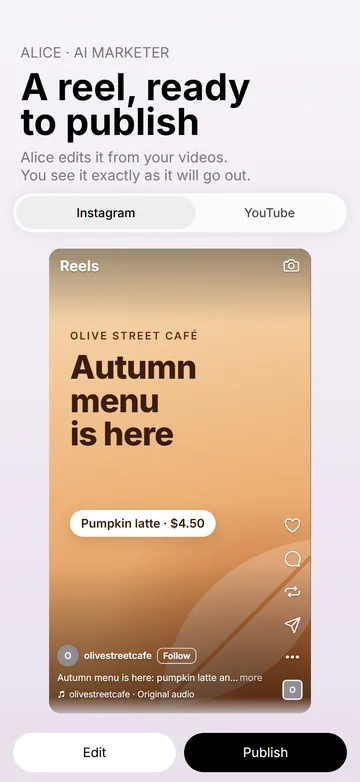
- A finished reel on a post card. She renders the reel in full quality, checks it and sends it to you with the post texts as a post card; after you tap Publish, that very video goes out, without rendering again.
- Not AI content. Editing your own photos and videos is not AI content. A finished edit that contains AI parts carries a machine-readable AI label.
Watching costs 1 credit per second of video, and editing 10 credits for each started second of the finished video, with music, voice-over and captions included. A 30-second reel cut from three 20-second videos is 60 + 300 = 360 credits, music included; the reel is charged as soon as it is ready.
AI voiceover and background music for your videos
Sound is half of a Reel. Alice adds it in the same chat where she edits the video, so the voiceover and the music don't each need an app of their own:
- AI voiceover. Send the text in the chat or ask Alice to write it for the video, and she voices it in a library voice; the voiceover is included in the editing price. A real person's voice is not offered.
- Captions from the voice. Word-by-word captions in your brand's colours can follow any voice in the video — the voiceover or someone speaking on camera.
- AI background music. A track made for that video — instrumental unless you want a song — also included in the editing price. In the edit the music drops under speech, and the loudness is evened out for social networks.
The voiceovers and tracks she makes are kept in Materials → Audio, and the agents can take them into a later video. Sound is part of the Montage studio, which comes with every plan; if you want your ready video published as it is, with its own sound and nothing added, that costs nothing. If a video needs someone talking to the camera, film it yourself: Alice edits it and adds music under it. The music she creates carries built-in invisible AI marking, like her pictures and clips.
For example, a 30-second reel cut from two 15-second videos of yours, with a 500-character voiceover and one music track: watching 30 + editing 300 = 330 credits, the voiceover and the music included.
Publishing to Reels, TikTok and Shorts
A finished video goes out as a post with its own text for each network, in the language of that account's audience — straight away or scheduled up to 30 days ahead:
| Network | Where the video goes |
|---|---|
| Reels, Stories and posts on a professional (Business or Creator) account | |
| Reels, Stories and posts on a business Page | |
| TikTok | A draft in your TikTok app — you publish it there |
| YouTube | Videos and Shorts |
A Story takes exactly one photo or video; a post takes up to 10. Every post is listed on the Published tab of Posts with its status and statistics per network — views, reach, likes, comments, shares, saves and more. Every post Alice prepares in the chat goes out only after you tap Publish on its post card. Her Autonomy switch matters only for the posts of an approved Social media plan (the Social media plan works on every subscription plan; the switch comes with Business and Professional, and on Start it is always off): on — she schedules them herself; off — each comes to you as a post card and waits for your Publish. A reel with defects found by the quality check never goes out without your Publish anyway. The other four networks, the weekly plan and comment replies are covered on the page of Alice, the AI marketer.
Video ideas from YouTube links
- A YouTube link in the chat. Send a link to a public YouTube video and Alice watches it, then tells you what is in it or makes your version. It costs 1 credit for each started second watched, charged once the answer is ready; a video over 10 minutes is watched only after you agree. For videos from other sites, send her the file instead.
“Your version” means your own original video — your footage, your products, your place — not a copy of someone else's. Watching by link uses YouTube API Services, and the YouTube Terms of Service apply. Ideas you can film on a phone and how an idea becomes your own reel: Reels ideas for small business.
AI video for a small business in practice
- A new product. The owner sends one photo: “@Alice, a short vertical video of this product for Instagram and YouTube.” Alice makes an 8-second HD 720p clip that starts from the photo and puts a music track under it: 8 × 20 credits for the clip and 8 × 10 for the edit, music included — 240 credits. It goes out as a Reel and a Short, each with its own text.
- A project, start to finish. A sole trader sends six 30-second phone videos of the project and writes “@Alice, a before-and-after reel of about a minute with a voice-over.” Alice watches the six videos (6 × 30 s = 180 credits), cuts a 60-second reel with a voice-over of 1,000 characters (60 × 10 = 600 credits, the voice-over included) and sends it with the texts. The reel comes as a post card, so nothing goes out before the owner taps Publish — 780 credits in all, plus Alice's work in the chat.
- An owner and a video she liked. She pastes a link to a public YouTube video from her business's category and asks why it works. Alice watches it — a 4-minute video is 240 credits — and explains why it works. The owner then films her own version at her business, and Alice edits it into a Short and a Reel.
Only your footage, AI labels and who owns the video
- Only your own material, if you prefer. Switch off Photo generation in Alice’s Agent tools and Video generation in the Montage studio: Alice then uses only your photos and edits reels only from your own videos and photos.
- AI marking. The pictures, AI clips and music she creates carry built-in invisible AI marking; a finished edited video with AI parts carries a machine-readable AI label; and when a post contains AI-made media, the AI label of Instagram, TikTok and YouTube is set automatically. That marking must not be removed. These measures follow the transparency rules of Article 50 of the EU AI Act.
- No fakes. No made-up customers, staff or testimonials, no famous people, no children; your product, dish and place are shown as they are. You and your team can appear, from your own photos and videos, with consent.
- The video is yours. Everything the agents create at your request is your content: Weyvox claims no rights to it and uses it only to run the service — to store it, show it and publish it when you ask. Whether the law protects AI-generated content by copyright depends on the country, and other people's faces, voices, brands or works need their permission.
An AI video maker vs editing it yourself or hiring an editor
The usual ways a small business gets video onto its accounts, compared by category, since the details differ from one provider to the next.
| Option | Who does the work | Strong side | Weak side |
|---|---|---|---|
| Editing it yourself | You, in an editing app on your phone | Full control and your own style | Hours per video; editing is a skill of its own; posting stops in busy weeks |
| A freelance video editor | A person you brief and pay per video | Human taste and judgement; some also film on location | Usually the most expensive per video; briefs, approvals and waiting; your footage still has to reach them |
| AI video generators | You type a prompt and download the clip | Fast clips and ideas | They know nothing about your business; the texts, the posting and each network's format stay with you |
| AI editing apps | You upload footage and the app cuts it | Quick cuts of your own material | Writing the post, publishing and scheduling stay with you |
| Weyvox — Alice | An AI agent in your business app, in one chat with the rest of the team | Clips, edits of your footage, voice-over, music and sound in one chat; writes each network's text from your business profile; publishes or schedules | Clips are short and without speech; reels up to 10 minutes; no ads; TikTok videos arrive as drafts; AI clips are the costliest item |
These are not either-or. Film the moments that matter yourself and let Alice do the cutting, the sound and the posting — or keep an editor for the big video of the year and Alice for the weekly Reels. How her editing compares, point by point, with an editor you work in yourself: Weyvox vs CapCut.
What AI video costs
Weyvox prices are in credits: 1 credit = €0.01 excl. VAT. Alice's work is paid from your plan's monthly credits first, then from extra credits: Start — €25 a month excl. VAT with 2,500 credits; Business — €110 with 11,000; Professional — €250 with 25,000. Her work in the chat — writing, planning, publishing — is charged at token rates (500 credits per million input tokens, 2,500 per million output tokens), and video has unit prices. Alice's Montage studio — AI clips, editing, sound and watching videos — comes with every plan:
| What | Price |
|---|---|
| AI video clip, HD 720p | 20 credits per second of the clip; an extension is charged as a whole clip of the new length |
| Video editing — a reel, with music, voice-over and captions included | 10 credits for each started second of the finished video (30 seconds — 300 credits) |
| Watching a video — yours, or YouTube from a link | 1 credit per second of video; YouTube over 10 minutes — only after you agree |
| Publishing your own ready video as it is | No charge |
You pay only for a finished result: a refusal or a failure is not charged, a reel arrives finished and is charged as soon as it is ready, and before anything costly Alice names the price.
A worked month. A small business posting two videos a week — eight in a month:
- 4 reels of 30 seconds from its own footage, three 20-second videos each: watching 4 × 60 s = 240 credits; editing 4 × 30 × 10 = 1,200 credits, music and captions included — together 1,440 credits
- 4 AI clips of 8 seconds in HD 720p, each published as an 8-second reel with music: 4 × (8 × 20 + 8 × 10) = 960 credits
- Video for the month: 1,440 + 960 = 2,400 credits, plus Alice's work in the chat at token rates.
The studio is on every plan, but a month like this takes almost all of Start's 2,500 monthly credits; on Business it fits within 11,000 with plenty left for the other agents. A second of AI clip costs twice a second of editing, and the length of the finished video sets the bill, so shorter reels cost less. Extending a clip is priced as a whole clip of the new length: taking an 8-second clip to 16 seconds costs 16 × 20 = 320 credits, and Alice names the price before she starts. Every unit price is on the pricing page.
What she will not do
- Make talking clips. AI clips are 3–10 seconds and without speech; a clip can be extended up to 40 seconds within two days. For someone talking to the camera, film it yourself — Alice edits it.
- Use a real person's voice. Voice-overs come from a library of voices; a real person's voice is not offered.
- Make long videos. An edited reel is up to 10 minutes.
- Fake people. No made-up customers or staff, no famous people, no children — and she never identifies anyone in your videos.
- Publish on TikTok by herself. A TikTok video arrives as a draft in your TikTok app, and you publish it there.
- Watch videos from any site by link. Links work for public YouTube videos; from other sites, send her the file.
- Promise views. Nobody can guarantee views, followers or sales, and Weyvox does not. Each network's own rules apply to what is published there, including its rules on AI-generated media.
- Work without credits. When the plan credits and extra credits are both used up, paid work stops until you buy extra credits or the next month's plan credits arrive; without an active subscription it pauses even with credits left.
With staff on the Business or Professional plan, connecting the accounts stays with you (and a deputy administrator on Professional); a team member posts only on the networks you tick for them under Social media on their card. The legal side is in the Terms of Use, sections 14–16; every one of Alice's screens is described in the documentation.
Alice and the other Weyvox agents
Alice is the AI marketer in Weyvox. She shares one business profile, price list and customer list with the other agents, so a video is not made in a vacuum. The offer and its price come from the price list kept by Marc, the AI manager; Cindy, the AI receptionist, can take the calls a post brings in — see also Can AI answer phone calls for my business?; and Leo, the AI coordinator, hands work to the other agents, remembers what matters about you and, on the Business and Professional plans, runs your goals. An agent you switch off costs nothing. For everything else Alice does — eight networks, a weekly plan, comment replies and statistics — see Alice, the AI marketer. How the agents work together: what AI employees can really do for a small business.
Questions people ask
Can AI make videos for Reels, TikTok and Shorts?
Yes. In Weyvox, Alice — the AI marketer — generates short vertical AI clips of 3–10 seconds in HD 720p and edits reels of up to 10 minutes from your own photos and videos, with voice-overs and music. She publishes them as Instagram and Facebook Reels and as YouTube Shorts, and sends TikTok videos to your TikTok app as drafts.
Can AI edit my own videos into a reel?
Yes. Send Alice your photos and videos in the chat, up to 20 per message, or let her take them from Materials. She watches each video once, cuts a reel of up to 10 minutes, adds sound if you want it and sends the finished reel with the post texts as a post card; after you tap Publish, that very video goes out. Editing costs 10 credits for each started second of the finished video, with music, voice-over and captions included.
How long can an AI video be?
An AI clip is 3–10 seconds long and has no speech; a clip Alice made can be extended up to 40 seconds within two days, and the extension is charged as a whole clip of the new length. A reel she edits from your photos, your videos and her clips can be up to 10 minutes.
Can AI do a voiceover and add music to my video?
Yes. Alice adds an AI voiceover in a library voice and music — instrumental unless you want a song. Both are included in the editing price, 10 credits for each started second of the finished video, together with the captions. Sound is part of the Montage studio, which comes with every plan. A real person's voice is not offered.
How do I choose music for a TikTok or Reels video?
Pick music that suits the mood and pace of the video and doesn't drown out the voice-over or anyone speaking on camera — and that you have the rights to: other people's songs and works only with their owners' permission. The simplest way is to ask Alice to create a track for that video: instrumental unless you want a song, included in the editing price. The track is your content, and it carries built-in AI-content marking.
How much does an AI video cost?
In Weyvox, an AI clip costs 20 credits a second (1 credit = €0.01 excl. VAT) in HD 720p, so a 10-second vertical clip is 200 credits. A reel from your own footage is priced by its length: 10 credits for each started second of the finished video, with music, voice-over and captions included, plus 1 credit per second for watching your videos — 30 seconds cut from three 20-second videos comes to 360 credits. The Montage studio comes with every plan; it is paid from your plan's monthly credits — Start is €25 a month excl. VAT with 2,500 credits, Business €110 with 11,000 — and then from extra credits.
Does the AI post videos to TikTok automatically?
Not to TikTok itself: a TikTok video arrives as a draft in your TikTok app, and you publish it there. On Instagram, Facebook and YouTube Alice publishes herself once you tap Publish on the post card; only the posts of an approved Social media plan go out without it, and only with her Autonomy on — and a reel with defects found by the quality check never goes out without your Publish anyway.
Will people know the video was made with AI?
Where AI made it, yes. The pictures, clips and music Alice generates carry built-in invisible AI marking, a finished edit with AI parts carries a machine-readable AI label, and the AI label of Instagram, TikTok and YouTube is set automatically when a post contains AI-made media. Editing your own footage is not AI content.
Who owns the videos the AI makes?
You do. Everything the agents create at your request is your content: Weyvox claims no rights to it and uses it only to run the service. Whether the law protects AI-generated content by copyright depends on the country, and you remain responsible for what is published in your name.
Let Alice make your next video
The quickest way to see her at work is the introduction right after you sign up: tell Leo what brought you to Weyvox and choose Alice for your team, and she can make a photo for a post about your business, one clip of up to 5 seconds or a reel from your own photos and videos — all at no cost and before you choose a plan. Weyvox is available for iPhone and Android.
Meet Alice, the AI marketer · Plans and prices · All guides
Free trial at registration: the agents you choose show their work on your own business at no cost, within set limits; then you choose a plan.