Instagram posts, carousels, Reels and Stories: what Alice makes
Alice publishes to a professional Instagram account — Business or Creator — that you connect yourself on her Social media screen: tap Instagram, sign in on Instagram's own page and come back to the app. If your account is still a personal one, switch it to a professional account in Instagram first.
| Format | What goes into it | Where the picture comes from |
|---|---|---|
| Photo post | One photo and a caption | Your photo, edited if you like, or a picture Alice creates |
| Carousel | Several photos in one post — up to 10 photos or videos — with one caption | Your photos, or yours together with pictures Alice creates |
| Reel | A video of up to 10 minutes and a caption | Alice edits it from your photos and videos and can add her own clips and sound |
| Story | Exactly one photo or video | Yours, or one Alice makes |
Instagram needs a picture or a video in every post — text alone is not enough there — so a post always goes out with one. The same post can also go to Facebook, Threads and the other networks you connect, each with its own version of the text. Video in depth — AI clips, voice-overs and music — is covered in AI video maker for Reels, TikTok and Shorts.
AI caption generator that writes from your business
You ask in the team chat the way you would ask a colleague: “@Alice, a carousel of our three new autumn products for Instagram, with prices.” Or you tell Leo what you need, and he hands the job to Alice.
- Facts from your business, not invented copy. Prices, offers and opening hours come from your business profile and the price list that Marc keeps — the price list is the only source of prices. Alice never invents offers, reviews or customers.
- In your audience's language. Each caption is written in the language of the audience of that account.
- A version for each network. The Instagram caption is written for Instagram. If the same post also goes elsewhere, each network gets its own text: short for Threads (up to 500 characters) or Bluesky (up to 300), more formal for a LinkedIn company page.
- Now or later. She publishes straight away or schedules the post up to 30 days ahead.
Because the captions draw on the same price list the rest of the team uses, a price is changed in one place — with Marc — rather than in every post you plan to write.
Pictures for the post: your photos, edited or AI-made
- Your own photos. Send them in the chat, up to 20 per message, or let Alice take them from Materials — the library of everything you give the agents and everything they make.
- Edited. She edits your photos: a new background, an object removed, another style.
- Created. With no photo at hand, she creates a picture from a description in 1K, at 10 credits per image.
- Real things, shown as they are. No made-up customers, staff or testimonials, no famous people, no children; your product, dish and place are shown as they are. You and your team can appear, from your own photos and videos, with consent.
Only real photos on your account? Switch off Photo generation, the first switch in Alice’s Agent tools, and Alice uses only your photos. The pictures she creates carry built-in invisible AI marking, and when a post contains AI-made media, Instagram's AI label is set automatically.
An AI content calendar for Instagram: the Social media plan
To post on a steady rhythm rather than one request at a time, Alice has a Social media plan screen — the first row of Agent settings for social media on her Social media screen:
- What to post about. You write the plan — or agree it with Alice in the chat — with the topics, the tone, what to promote and what to avoid. Alice sends the final version as a plan card with Approve and Edit; only your Approve saves the plan and turns it on. A change comes as a new plan card and deleting the plan as a Delete plan card: Alice never saves, changes or deletes the plan herself.
- How often, and where. Posts per week, from 1 to 21, and the networks she runs — Instagram on its own or together with others.
- A week ahead, every day. Once a day she looks at the coming week and prepares the posts that are missing up to your weekly number, each for a different day, with pictures. With her Autonomy on (Business and Professional plans) she schedules them herself; with it off, and always on Start, she sends each one to you as a post card with a push notification.
- When it runs. The autopilot works when three things are true: Plan is active is on, the plan has text, and she runs at least one connected account. Writing the plan text alone switches nothing on. A paused plan prepares no new posts, while posts already scheduled still go out.
Single posts can be scheduled by hand as well — ask for a date up to 30 days ahead — and a scheduled post can be changed or cancelled until it goes out.
The Social media plan comes with every plan — Start, Business and Professional. On Start nothing is published without you: every post of the plan comes to you as a card first and goes out only after you tap Publish.
Approve every post, or let her publish
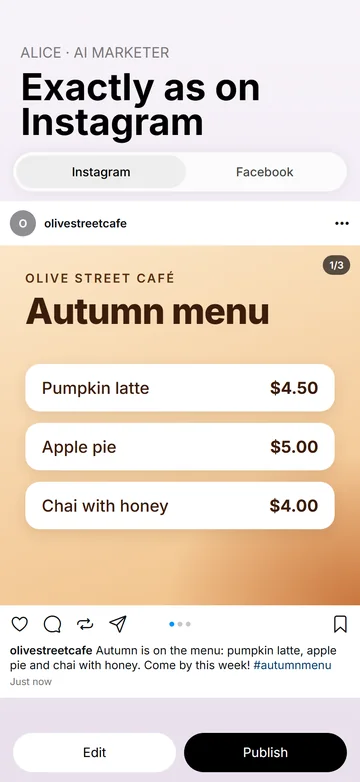
- The post card. Every post Alice prepares comes to the chat as a card — the cover, the networks and formats, the text and the publishing time — with Publish and Edit. Tap it to see the post full screen exactly as it will look on Instagram, hashtags included; Edit — say what to change, and she sends a new version of the card. In the chat, nothing is published until you tap Publish.
- Posts by the plan: Autonomy off. Alice still prepares them, and each one comes to you as a post card with a push notification; it goes out only after you tap Publish.
- Posts by the plan: Autonomy on. She publishes the plan's posts on her own, without waiting for you to tap Publish — except a reel with defects found by the quality check, which never goes out without your Publish anyway.
- Published. On this tab of Posts every post is listed with its status and statistics per network. A failed post is always reported in the system chat; successful ones too, while Notify about publications is on.
- Changing or cancelling. After you tap Publish, the post is on the Scheduled tab of Alice's Posts screen with its status: preparing, scheduled, publishing or published (published posts stay there for 30 days). Until it goes out, you can change or cancel it there with Edit and Cancel or by asking Alice: she changes the text and time at once, while a new photo or video comes as a new post card, and tapping Publish on that card cancels the earlier post. A post already published on Instagram is deleted by you, in the Instagram app.
Whichever way the switch is set, what goes out on your account counts as yours, as if you had posted it yourself. With staff on the Business or Professional plan, connecting the accounts and the social media plan stay with you (and a deputy administrator on Professional); a team member posts only on the networks you tick for them under Social media on their card.
After the post: Instagram comments and statistics
- Comments. With Access to comments on — it is on the Social media screen — Alice answers comments under her posts when you ask her in the chat; on her own — checking for new ones every two hours — only with her Autonomy on (Business and Professional plans). On Instagram she can also hide a comment. With it off, she only shows you comments when you ask.
- Signed as an AI. Every reply she writes is signed as the AI agent of your business, so people know they are talking to an AI.
- Statistics. For a published post: views, reach, likes, comments, shares, saves and more. For the account: followers, posts and engagement over the period you choose. The figures come from the network and can arrive late or incomplete.
Alice does not send direct messages. Comments on the other networks and everything else she does are covered in Alice, the AI marketer.
AI Instagram posts for a small business in practice
- A carousel with prices. The owner sends three phone photos: “@Alice, a carousel of this week's three new products for Instagram, with prices.” Alice writes the caption with the prices from the price list and lays the three photos out as one three-slide carousel. The carousel comes to the chat as a post card; the owner swipes through the slides and taps Publish. The post itself costs 3 × 10 = 30 credits, plus Alice's work in the chat.
- A shop's new arrival. The only photo of a new coat was taken on a hanger in the stockroom. “@Alice, give it a clean background and post it.” She edits the photo, writes the caption from the price list and sends one post card for Instagram and the Facebook Page, each with its own version of the text; once the owner taps Publish, it goes out on both.
- A weekly plan on autopilot. On Social media plan the owner writes “one practical tip a week for customers, a calm tone, opening hours before holidays”, sets 2 posts a week for Instagram and Facebook, and, on the Business plan, turns on Autonomy and Plan is active. Alice keeps the coming week scheduled with pictures she creates in 1K: about 8 posts a month × (10 + 10) = about 160 credits, plus her work in the chat.
- A Story of the day. “@Alice, today's offer in Stories on Instagram and Facebook,” with one photo — a Story takes exactly one. It goes out as soon as the owner taps Publish on the card.
An AI post generator vs templates, schedulers or a freelancer
The usual ways a small business keeps its Instagram going, compared by category, since the details differ from one provider to the next.
| Option | Who does the work | Strong side | Weak side |
|---|---|---|---|
| Doing it yourself in the Instagram app | You, from your phone, between jobs | Your own voice and full control | Captions, pictures and posting take time every week; posting stops in busy weeks |
| Design templates | You fill in a template and post it | A polished look, quickly | The words, the prices and the posting are still yours |
| AI caption writers | You ask for a caption, then copy it into Instagram | Fast drafts and ideas | They know your prices only if you type them in; the picture, posting and replies stay with you |
| Scheduling tools | You write and design; the tool publishes on time | A calendar and a queue across several networks | Every caption and picture is still yours to make |
| A freelancer | A person you brief and pay | Human taste and judgement; can also run ads and answer direct messages | Usually the most expensive option; briefs, approvals and waiting |
| Weyvox — Alice | An AI agent in your business app, in one chat with the rest of the team | Captions from your business profile and price list; photo posts, carousels, Reels and Stories; publishes or schedules; follows a weekly plan; answers comments | No ads or direct messages; needs a professional Instagram account; published Instagram posts are deleted by you in the app; you stay responsible for what is published |
These are not either-or. A freelancer can keep the big campaign of the season while Alice keeps the everyday posts going — and Autonomy off is the middle way for owners who want Alice to do the writing and the pictures but to see every post before it goes out.
What an AI Instagram post costs
Weyvox prices are in credits: 1 credit = €0.01 excl. VAT. Alice's work is paid from your plan's monthly credits first, then from extra credits: Start — €25 a month excl. VAT with 2,500 credits; Business — €110 with 11,000; Professional — €250 with 25,000. Her work in the chat — writing, planning, publishing — is charged at token rates (500 credits per million input tokens, 2,500 per million output tokens), and posts and pictures have unit prices. Alice's Montage studio, where reels are edited, comes with every plan:
| What | Price |
|---|---|
| A designed photo post or carousel | 10 credits per finished slide, charged when you tap Publish |
| Picture Alice creates, or your photo edited, 1K | 10 credits per image |
| A Reel | Priced as the editing of its video: 10 credits for each started second of the finished video, with music, voice-over and captions included (30 seconds — 300 credits) |
| Watching your video before editing | 1 credit per second of video |
| Publishing your own ready video as it is | No charge |
You pay only for a finished result: a refusal or a failure is not charged, a reel arrives finished and is charged as soon as it is ready, and before anything costly Alice names the price.
A worked month. A shop posting three times a week on Instagram — 12 posts:
- 4 three-slide carousels from the shop's own photos: 4 × 3 × 10 = 120 credits
- 4 photo posts with one picture Alice creates: 4 × (10 + 10) = 80 credits
- 4 Reels of 15 seconds from the shop's own videos, three videos of 20 seconds each: watching 4 × 3 × 20 s = 240 seconds — 240 credits; editing 4 × 15 × 10 = 600 credits, music and captions included — together 840 credits
- Posts and pictures for the month: 120 + 80 + 840 = 1,040 credits, plus Alice's work in the chat at token rates.
That fits within the Start plan's 2,500 monthly credits and leaves about 1,460 of them for Alice's chat work and the other agents. For a round planning figure, the cost simulator on the pricing page counts a post (text, hashtags, layout and editing of your materials; publishing costs nothing) at about 70 credits: 12 × 70 = 840 credits. Every unit price is on the pricing page.
What she will not do
- Post text alone to Instagram. Instagram needs a picture or a video in every post.
- Work with a personal Instagram account. Instagram — and Threads — need a professional (Business or Creator) Instagram account.
- Run ads or handle direct messages. Alice does not send direct messages, run ads, follow accounts, edit profiles or analyse competitors' accounts.
- Fake anything. No made-up offers, customers, staff, reviews or testimonials, no famous people, no children. Generated media carries AI marking, and that marking must not be removed.
- Delete a published Instagram post. You delete it yourself in the Instagram app; a scheduled post can be cancelled until it goes out.
- Promise reach. Nobody can guarantee views, followers or sales, and Weyvox does not. Instagram's own rules apply to what is published there, including its rules on branded content and AI-generated media.
- Work without credits. When the plan credits and extra credits are both used up, paid work stops until you buy extra credits or the next month's plan credits arrive; without an active subscription it pauses even with credits left.
The legal side is in the Terms of Use, sections 14–16; every one of Alice's screens is described in the documentation.
Alice and the other Weyvox agents
Alice is the AI marketer in Weyvox. She shares one business profile, price list and customer list with the other agents, so a post is not written in a vacuum. The offer and its price come from the price list kept by Marc, the AI manager, who also handles customers, orders and AI invoicing; Cindy, the AI receptionist, can take the calls a post brings in — see also Can AI answer phone calls for my business?; and Leo, the AI coordinator, hands work to the other agents, remembers what matters about you and, on the Business and Professional plans, runs your goals. An agent you switch off costs nothing. For the other seven networks, see Alice, the AI marketer; for video, AI video maker. How the agents work together: what AI employees can really do for a small business.
Questions people ask
Can AI make Instagram posts for my business?
Yes. In Weyvox, Alice — the AI marketer — writes the caption from your business profile and price list, uses your photos or creates a picture, and publishes photo posts, carousels, Reels and Stories to your professional Instagram account: at once, on a date up to 30 days ahead, or to a weekly plan.
Can AI write Instagram captions for me?
Yes. Alice writes each caption in the language of the account's audience and takes prices, offers and opening hours from your business profile and price list; she never invents offers, reviews or customers. If the same post also goes to Facebook, Threads or another network, each gets its own version of the text.
Can AI make an Instagram carousel?
Yes. Send Alice several photos in the chat — up to 20 per message — or let her take them from Materials. A post holds up to 10 photos or videos, and several photos make a carousel. A designed carousel costs 10 credits per finished slide — 30 credits for three slides.
Can AI make a content calendar for Instagram?
Yes — on every plan, that is the Social media plan. You write, or draft with Alice, what to post about, the tone, what to promote and what to avoid, and set Posts per week from 1 to 21. With Plan is active on, once a day she prepares the posts missing for the coming week, each for a different day, with pictures: with her Autonomy on (Business and Professional plans) she schedules them herself, with it off each one waits for you to tap Publish. On Start every post of the plan waits for your Publish.
Do I need an Instagram business account?
You need a professional account — Business or Creator. You connect it yourself on Alice's Social media screen, by signing in on Instagram's own page. Threads needs a professional Instagram account too.
Will the AI post to Instagram without my approval?
Only if you allow it. A post you ask for in the chat comes to you as a post card, and nothing goes out until you tap Publish. Posts by the weekly plan follow Alice's Autonomy: off — each one comes as a post card and waits for you to tap Publish; on — she publishes them on her own, except a reel with defects found by the quality check, which never goes out without your Publish anyway. A failed post is always reported in the system chat, and a post published on Instagram is deleted by you in the Instagram app.
How much does an AI Instagram post cost?
In Weyvox, a designed photo post or carousel costs 10 credits per finished slide (1 credit = €0.01 excl. VAT); a picture Alice creates is 10 credits (1K); a Reel is priced as the editing of its video, 10 credits for each started second of the finished video, music and captions included. Her work in the chat is charged at token rates. The cost simulator on the pricing page counts a post (text, hashtags, layout and editing of your materials; publishing costs nothing) at about 70 credits, and the Start plan is €25 a month excl. VAT with 2,500 credits.
Will my followers know a picture was made with AI?
Yes, where AI made it. The pictures Alice creates carry built-in invisible AI marking, and when a post contains AI-made media, Instagram's AI label is set automatically. If you want only real photos on your account, switch off Photo generation, the first switch in Alice’s Agent tools.
Can the same AI generate posts for my other social networks too?
Yes. Alice runs eight networks: Instagram, Facebook, TikTok, YouTube, LinkedIn, Threads, Pinterest and Bluesky. One post can go to several of them, with a separate version of the text for each — short for Threads (up to 500 characters) and Bluesky (up to 300). Instagram, TikTok, Pinterest and YouTube need a picture or a video, and on TikTok the post arrives as a draft in your TikTok app, where you publish it yourself.
Let Alice make your next Instagram post
The quickest way to see her at work is the introduction right after you sign up: tell Leo what brought you to Weyvox and choose Alice for your team, and she can make a photo, a short clip of up to 5 seconds or a reel from your own photos and videos — at no cost, before you choose a plan. Weyvox is available for iPhone and Android.
Meet Alice, the AI marketer · Plans and prices · All guides
Free trial at registration: the agents you choose show their work on your own business at no cost, within set limits; then you choose a plan.