

AI marketer for small business
Alice runs your social media: she writes a version of each post for eight networks, publishes it after your “Publish” or by your plan, replies to comments and makes the photos — and, in the Montage studio on the Business and Professional plans, AI clips, music and reels — from your own prices, offers and footage. It all runs in the Weyvox app on your phone: ≈ 70 credits per post on average, with plans from €25 a month excl. VAT.



- TikTok
- YouTube
- Threads
- Bluesky
Social media that keeps going
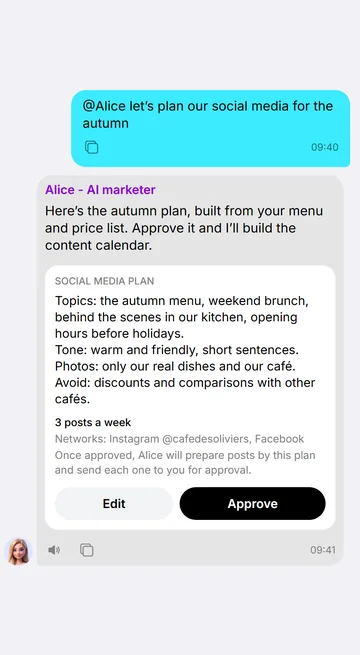
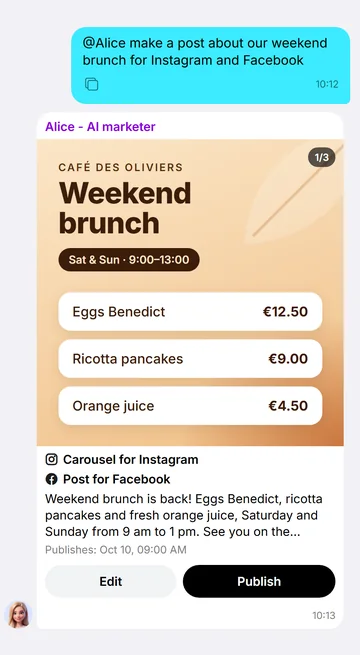
Alice plans, writes and designs every post; in the chat, nothing goes out until you tap “Publish”.
Write what to post about and how often — 1 to 21 posts a week. Once a day Alice prepares the missing posts for the coming week, with pictures. The plan and autopilot come with every plan: on Start each post comes to you as a card and goes out only after your “Publish”; on Business and Professional, with her Autonomy on, she publishes them herself.
Each post comes to the chat as a card, exactly as it will look on the network. It goes out when you tap Publish — at once or at the time on the card, up to 30 days ahead.
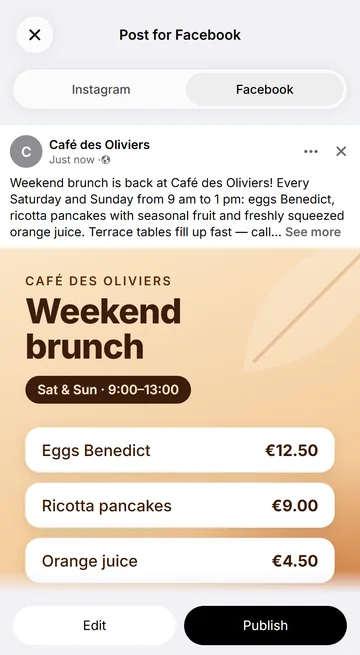
Tap the card to see the post full screen — text, hashtags, slides and video — with a switch between networks.
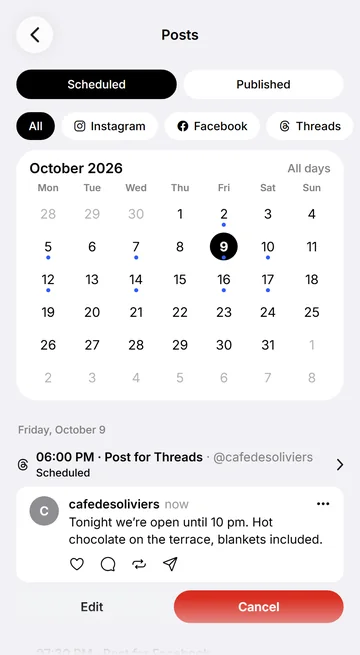
The Scheduled tab: every post that is going out, by day and network, with its state — until it is published you can change or cancel it. Published: the whole history with its networks.
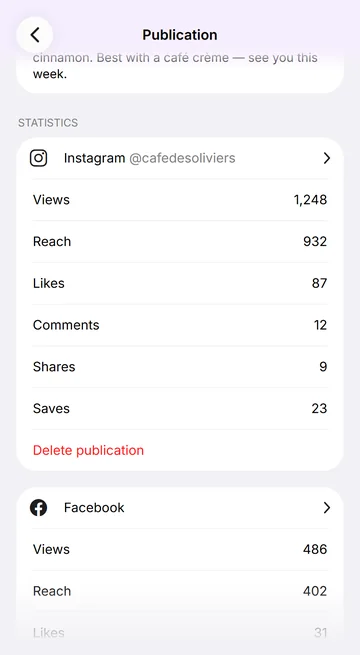
Views, reach, likes, comments, shares and saves for each post, per network; followers and engagement for each account over the period you choose.
Eight networks
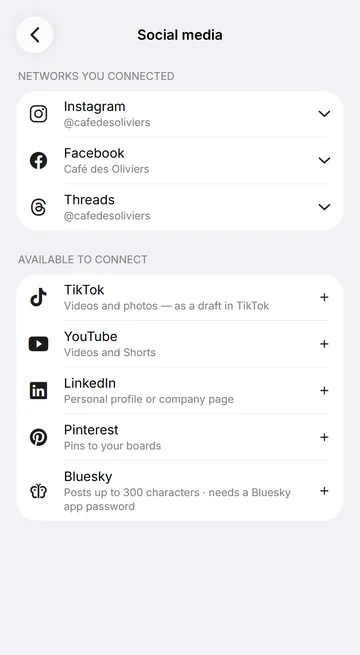
Instagram, Facebook, TikTok, YouTube, LinkedIn, Threads, Pinterest and Bluesky — a separate version of every post for each network, in its audience’s language.
- InstagramA professional account: posts, Reels, Stories
- FacebookA business Page: posts, Reels, Stories
- TikTokVideos and photos arrive as a draft in your TikTok app
- YouTubeVideos and Shorts
- LinkedInA personal profile or a company page
- ThreadsShort posts of up to 500 characters
- PinterestPins to your boards
- BlueskyPosts of up to 300 characters
You connect each account yourself, signing in on the network’s own page, and can disconnect it at any time.
Alice edits on her own. You see every frame
Say what video you need — Alice watches your videos and photos, writes a plan, edits the reel on Weyvox’s own server and checks it. You see every scene before the edit starts, and any of them can be changed in plain words.
Material
What Alice does
- Watches every video: scenes, words, text on screen
- Picks the best moment as the hook
- Cuts between words, adds transitions and motion
- Adds captions, music and your brand
- Renders on Weyvox’s server and checks quality
Video price: 15 credits
Preparing the materialEditing the framesMixing the sound and checking qualityDone — the video is in your chat
Storyboard
Quality check
- No black or frozen frames
- No sudden silence
- Loudness set for social networks
- No text under network buttons
Caption style
On-screen text
You say what video you need — Alice does the rest herself. Tap a material or a format.Videos from your phone, up to 10 GB a file: Alice watches each one — scenes, words, text on screen.Photos become scenes too — with slow zooms and motion.Short of footage? Alice makes an AI clip from your photo: 3–10 seconds, HD 720p.9:16 — for Reels, Stories, TikTok and Shorts.4:5 — for feeds.1:1 — for feeds.16:9 — for YouTube or a website.First comes the plan: every scene already plays on its own, next to the sound, captions, length, editing time and price. Nothing is edited before “Make it”.Tap a scene and say what to change — only that scene changes, the rest of the plan stays as it was.Captions word by word, from any voice in the video.No captions.“Make it” — and the edit starts. This is what you see while it runs.While the edit runs — the stage, an honest time left and the frames as soon as they are ready. The preview comes in full quality right away, free.This scene was changed — only its piece was re-edited, the rest of the reel is the same.Black or frozen frames, silence, loudness, text under a network’s buttons — Alice fixes what she finds before you see the reel.“Publish” makes this very video the final one — without editing it again.Alice places captions, on-screen text and your brand herself — you only say what to change.Your logo, colours and font on every reel.No logo and no brand colours.Font, colours, position, outline, box and animation of the captions — set for your reel.Captions only.A hook in the first seconds — animated in code: sharp and clean on any screen.A list, a price or a counter — in code too, not as a picture.A call to action at the end — a button in your brand colours.Voice-over and music — Alice mixes the sound herself.The music drops under every phrase by itself.Without ducking, the music drowns out the voice.Your videos’ own sound — as recorded.The video’s sound is off — the voice-over and music stay.
Say what video you need — Alice does the rest: she watches every one of your videos and photos, puts the best moment first as the hook, cuts between words and adds transitions, motion, text, captions, music and your brand. The material is your videos and photos (up to 10 GB a file) and her AI clips from a photo — 3–10 seconds in HD 720p. Up to 10 minutes in Full HD; 9:16, 4:5, 1:1 and 16:9.
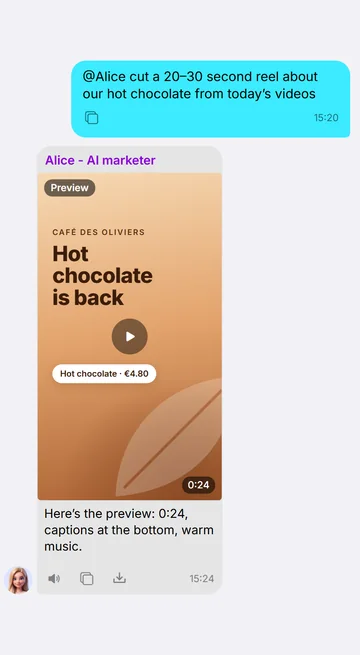
Before editing, Alice shows the plan: every scene already plays as its own short clip, next to the sound, captions or none, length, editing time and price. The edit starts only after “Make it”.
While the edit runs you see the stage, an honest time left and the frames as soon as they are ready; the finished reel arrives in the chat with a notification. The preview comes in full quality right away, free. Tap any scene and say what to change — only that scene is re-edited. Before showing it, Alice checks for black or frozen frames, silence, loudness and text under a network’s buttons; “Publish” makes this very video the final one, without editing it again.
Captions word by word from any voice — the voice-over, your recording or people in the video: the font, key words in your brand colour, position, box and animation. Alice makes the hook, price, list, call to action and interface motion in code — sharp and clean on any screen. The frame always stays whole, with blurred edges. Your logo, colours and font on every reel.
Voice-overs in a library voice and music for the reel. Alice keeps the sound of each of your videos, turns it down or mutes it; the music drops under speech by itself, and the overall loudness is evened out for social networks.
The Montage studio comes with the Business and Professional plans; on Start, Alice publishes your own ready video as it is. The preview is free; a finished reel is 15 credits for each started half-minute.
Content made from your own business
Her material comes from your business — prices, offers and hours from the profile and price list, photos and videos from your materials — never invented offers, reviews or customers.
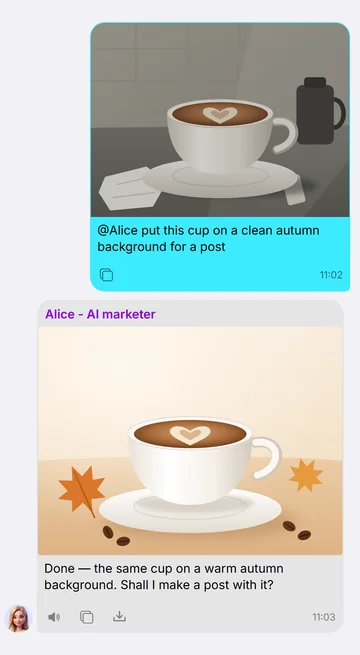
Pictures from a description, or your own photos edited — a new background, an object removed — and posts and carousels laid out from templates in your brand colours. Included in every plan.
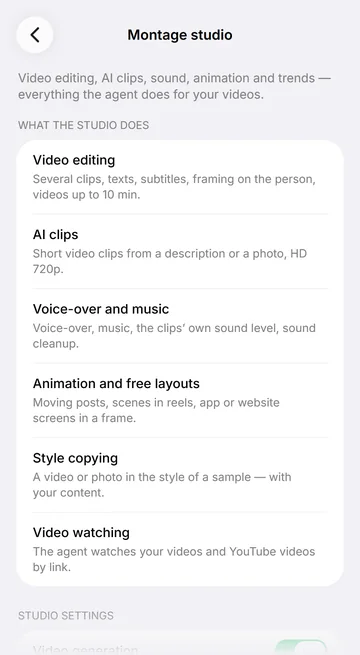
A reel of up to 10 minutes cut from your videos and photos: the best moment first, word-by-word captions, your logo and colours, music that drops under speech, a quality check. Voice-overs in a library voice and music. A real person’s voice is not offered for voice-overs. Editing is in the Montage studio (the Business and Professional plans); on Start Alice publishes your ready video as it is.
Reel editing, AI clips in HD 720p of 3–10 seconds (extendable to 40), voice-overs and music, animated posts and video watching (yours and YouTube by link) — on the Business and Professional plans. On Start the studio is visible in the app and works from Business.
You decide what she may make and whether she publishes the plan’s posts herself; a reel with defects never goes out without your “Publish”. On Instagram, Facebook, LinkedIn, Threads and Bluesky she answers comments under her posts every two hours — each reply signed as the AI agent of your business. Whether she publishes the plan’s posts by herself is set by her Autonomy switch (Business and Professional plans). Photo generation is the first row of her Agent tools, comments and notifications on Social media.
You pay for what she makes
Alice is included in every Weyvox plan, from €25 a month excl. VAT, together with the rest of the team. The plan’s monthly credits pay only for the work done, and an agent you switch off costs nothing.
A designed post and a reel are charged when you tap Publish; photos, clips, voice-overs and music each have a unit price, and her writing work is charged like any chat. A reel’s preview costs nothing.
What a credit is: 1 credit = €0.01 excl. VAT

Prices of the work
- Images 1K
- 10 credits per image
- Video HD 720p
- 20 credits per second of the finished clip; an extension is charged as a whole clip of the new length
Plan credits every month
- Start · €25 excl. VAT
- 2,500 credits a month
- Business · €110 excl. VAT
- 11,000 credits a month
- Professional · €250 excl. VAT
- 25,000 credits a month
Alice and the best-known social media tools
The tools that AI assistants recommend most often for a small business’s social media, compared on the facts their own websites publish.
 Weyvox | Buffer | Hootsuite | Metricool | Ocoya | Canva | |
|---|---|---|---|---|---|---|
| Price | Plan from €25 a month; ≈ 70 credits per post on average | Free for 3 channels; paid from $5–6 a channel a month | $99 a user a month (billed yearly); no free plan | Free for 1 brand; €16–20 excl. VAT a month for 5 brands | $29 a month | Free plan; paid plans priced by country |
| Works on its own, in the background | Yes: on every plan the autopilot prepares the week’s missing posts with pictures every day — on Start each one waits for your Publish; with “Autonomy” on (Business and Professional plans) she publishes plan posts herself; she replies to comments every two hours | Publishes on your schedule what you prepared | Automation on higher plans | Publishes on your schedule; AI helps with the text | Fills the calendar; publishes after your approval | Scheduler on paid plans |
| Networks | 8: Instagram, Facebook, TikTok, YouTube, LinkedIn, Threads, Pinterest, Bluesky | 12, including X, Google Business Profile, Mastodon | 10, including X and Google Business Profile | 11, including Google Business Profile; X as an add-on | Over 20, including X, Telegram, Discord | Scheduler: Facebook, Instagram, LinkedIn, Pinterest and others |
| Writes and publishes | A version for every network; out after your Publish, or by the plan on autopilot | AI text assistant; you schedule | AI posts and images; automation on higher plans | AI text assistant; scheduling | Fills the calendar; publishes after your approval | AI design tools; scheduler on paid plans |
| AI photos, video, voice, music | Photos; AI clips of 3–10 s, voice-overs, music — Business and Professional plans | Text only | Text and images | Text only | Text, images, short video | Images, video, voice-over, music |
| Reels from your own footage | Edited by the agent: up to 10 min, captions, music, quality check (Business and Professional plans) | Not stated | Not stated | Manual editor (web) | Not stated | Manual video editor |
| Replies to comments | The agent replies, each reply signed as AI | Inbox with AI suggestions | Inbox; automated replies from Professional | Inbox; keyword auto-replies | Inbox; AI drafts replies | Not stated |
| On the phone | Everything in the iPhone and Android app | Planning, comments, analytics | Posts and messages | Most features; video editor on the web only | Not stated | App; Instagram scheduling from a desktop browser only |
| Interface languages | English, French, Ukrainian, Russian | English on the web and iOS; more languages on Android | 8, including French; no Ukrainian or Russian | 9, including French; no Ukrainian or Russian | Not stated | Many, including French, Ukrainian, Russian |
Checked on October 9, 2026 on each company’s official website: regular prices as published, excluding VAT unless stated; promotions left out. Names are trademarks of their owners. Sources: Buffer 1 · Buffer 2 · Hootsuite 1 · Hootsuite 2 · Metricool 1 · Metricool 2 · Ocoya · Canva 1 · Canva 2.
Can AI run a small business’s social media?
Yes. Alice writes and publishes posts on eight networks, replies to comments, makes the photos — and the clips and reels on the Business and Professional plans — and shows statistics. With a social media plan (on every plan) she keeps your accounts going on her own; each post still comes to you first unless you switch her Autonomy on (Business and Professional plans).
Will the AI post without my approval?
Not in the chat: every post comes to you as a card and goes out only when you tap Publish. Posts of an approved plan follow her Autonomy — off, each one comes to you with a push notification; on, she schedules them herself. A reel with defects found by the quality check never goes out without your Publish.
Which social networks does Alice work with?
Instagram (a professional account), Facebook (a business Page), TikTok, YouTube, LinkedIn (a profile or a company page), Threads, Pinterest and Bluesky. You connect them yourself on her Social media screen.
Can I use only my own photos and videos?
Yes. Switch off Photo generation in Alice’s Agent tools and ask her to edit only your own footage: she then works only with your own material. Editing your own footage is not AI content.
How much does an AI marketer cost in Weyvox?
Alice is included in every plan, together with the other agents; her Montage studio — editing, AI clips, sound and animation — is on the Business and Professional plans. You pay only for her work — a designed post, a reel by its length, photos, clips, voice-overs and music at their unit prices — from the plan’s monthly credits and then from extra credits, with an active subscription. The prices are in the Price section of this page.
Do people know the replies come from an AI?
Yes. Every reply Alice writes under your posts is signed as the AI agent of your business, and when a post contains AI-made media, the AI label of Instagram, TikTok and YouTube is set automatically.
Will an AI marketer bring more followers or sales?
Nobody can guarantee that, and Weyvox doesn’t. Alice keeps a steady rhythm and adapts every post to its network; the statistics come from the networks themselves.
Free trial at registration: tell Leo you have no time for social media — and Alice makes a photo or a short clip for your business free of charge.
Alice works best with the rest of the team
Each agent is a full product on its own. Together they share one business profile, one price list and one list of customers — and pass work to each other.
 AI coordinatorLeo
Give Leo a goal such as “15 new customers by the end of the month”: he plans Alice’s posts and Cindy’s calls within the spending limit you accept, and reports every week.
AI coordinator: Leo
 AI managerMarc
The prices and offers in Alice’s posts come from the price list Marc keeps, so a post never promises a price you don’t have.
AI manager: Marc
 AI receptionistCindy
A post brings calls: Cindy answers them, quotes the same prices and books the customers.
AI receptionist: Cindy
At registration Leo asks what brought you to Weyvox and suggests only the agents your problem needs. You choose the team yourself, and any agent can be switched on later in Settings. How registration works